
As an Amazon Associate I earn from qualifying purchases.
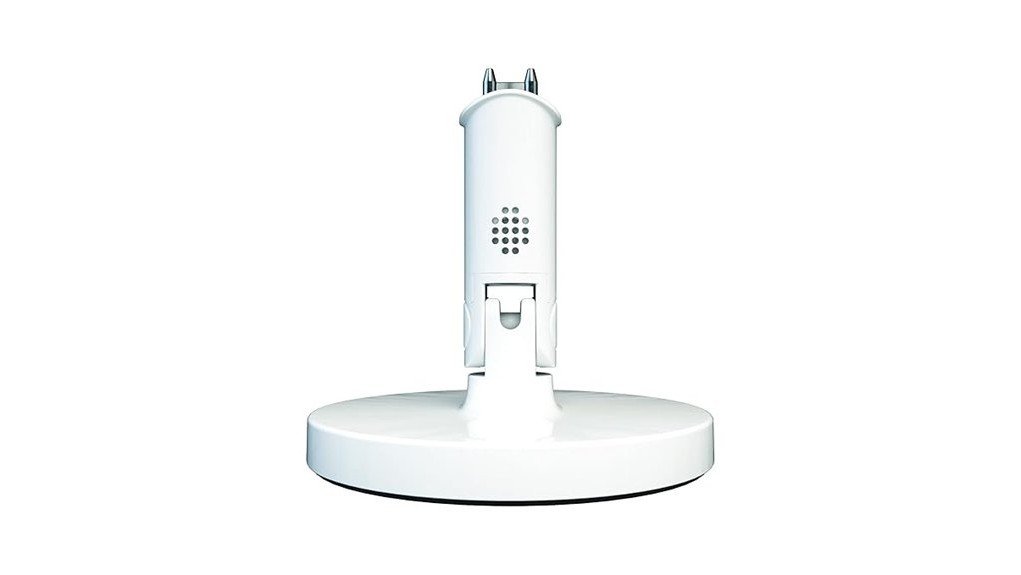
In this nanit flex multi stand review, we evaluate the Nanit Flex Multi-Stand Portable Travel Baby Monitor Accessory (Model N102, ASIN B01MDKHTL7)—a 0.5-pound tabletop and travel stand built exclusively for the Nanit Pro Camera (camera sold separately) that delivers a 130-degree room view and unlocks Alert Zone boundary alerts.
Nanit Flex Multi-Stand Review: Model N102 Specifications
| Specification | Verified Detail |
|---|---|
| Brand & Model | Nanit Flex Multi-Stand Portable Mount (Model N102) |
| ASIN | B01MDKHTL7 |
| Compatible Camera | Nanit Pro Smart Baby Monitor Camera (Camera Not Included) |
| Dimensions & Weight | 3.5" x 3.5" x 3.5" | 0.5 lbs (8 oz) |
| Viewing Angle | 130° Wide-Angle Room, Bassinet, or Playroom View |
| App Feature Unlocked | Alert Zone (exclusive to Flex Stand mode in the Nanit App) |
| Power & Travel Features | Includes AC Power Adapter & Cord | Remembers Last 10 Wi-Fi Networks |
Snap-and-Go Portability & Exclusive Alert Zone Feature
The standard Nanit Pro Wall Mount or Floor Stand stays anchored above the crib for overhead sleep analytics, which makes moving the camera to a living-room playroom, bassinet, or vacation rental inconvenient. The Nanit Flex Multi-Stand (Model N102) gives your Nanit Pro camera head a compact 3.5-inch tabletop base with its own dedicated power cord: simply pop the camera head off its nursery stand, snap it into the Flex Multi-Stand, and plug it in anywhere.
When docked in the Flex Multi-Stand, the Nanit Pro switches from bird’s-eye sleep tracking to a 130-degree wide-angle room view and unlocks Nanit’s Alert Zone feature—letting you define a forbidden boundary around a doorway or play area so your phone alerts you if a toddler enters or exits. Note that while Breathing Wear motion monitoring works in the Flex Stand, automatic sleep-time analytics (Sleep Insights dashboard) require the overhead Wall or Floor Stand.
Pros & Cons
Pros
- Ultra-compact 0.5-lb (3.5" cube) footprint slips easily into a diaper bag or carry-on
- Unlocks the Alert Zone virtual boundary feature in the Nanit app
- Supports sensor-free Breathing Wear monitoring within 3 feet of a bassinet or travel crib
- Includes a second AC power cord so you never have to unthread your nursery wall cord
Cons
- Accessory stand only—the Nanit Pro camera head is sold separately
- Overhead Sleep Insights analytics are disabled while docked in the angled Flex Stand
Step-by-Step Installation, Usage & Maintenance Guide
- Undock Your Nanit Pro Camera Head: Gently pull the Nanit Pro camera unit off your nursery Wall Mount or Floor Stand.
- Snap Into the Flex Multi-Stand: Press the camera head into the rounded Flex Stand socket until the connector clicks firmly.
- Position on a Shelf 3–6 Feet Away: Place the stand on a stable shelf or dresser with a clear 130-degree view of the travel crib or play space.
- Configure Alert Zone in the Nanit App: Open the Nanit app to angle the tilting neck and draw your custom Alert Zone boundary.
Who Should Buy It (And Who Should Skip It)
The Nanit Flex Multi-Stand (Model N102, B01MDKHTL7) is an essential secondary dock for existing Nanit Pro owners who travel frequently, move their camera between a bedroom bassinet and living room, or want to repurpose their Nanit Pro as a toddler playroom camera with Alert Zone.
Related Baby Safety & Nursery Reviews
- Nanit Pro Smart Baby Monitor Full Review
- Momcozy 5-Inch Smart WiFi Baby Monitor (BM04) Review
- eufy Security Baby Monitor E21 (4K Battery Camera) Review
Frequently Asked Questions
Does the Nanit Flex Multi-Stand (B01MDKHTL7) include the camera?
No. This listing is for the portable Flex Multi-Stand and its power cable only; the Nanit Pro Camera is sold separately (or bundled in complete Nanit Pro kits).
Does Breathing Wear work when the Nanit Pro is on the Flex Multi-Stand?
Yes. Sensor-free Breathing Wear monitoring works when the Flex Multi-Stand is positioned within 3 feet with a clear view of the baby, though overhead Sleep Insights analytics require the Wall or Floor Stand.
Does the Nanit Flex Multi-Stand have an internal battery?
No. The Flex Multi-Stand must be plugged into a wall outlet using its included power cable and adapter.
What is Alert Zone on the Nanit Flex Multi-Stand?
Alert Zone is an app feature exclusive to the Flex Multi-Stand that lets you draw a digital box on the 130-degree video feed and receive alerts whenever motion enters or leaves that zone.



[…] Nanit Flex Multi-Stand Portable Travel Mount Review […]